
Let#8217;s cut to it : choosing a laptop in 2026 isn#8217;t about chasing the flashiest spec sheet. It#8217;s about matching the machine to what you actually do with it. The honest shortlist of things that matter ? 16GB of RAM, a fast NVMe SSD, decent battery life, and a screen you won#8217;t squint at. Get those right and you#8217;ll be happy for years. Get them wrong and you#8217;ll be back online in eighteen months wondering why your #8220;new#8221; laptop already feels like wading through treacle.
First, Cut Through the Spec Jargon
Before we dig into each part, a quick tip. The spec jargon gets overwhelming fast #8211; Core Ultra this, Ryzen AI that #8211; so if you want to sit with detailed model breakdowns and side-by-side comparisons before committing, resources like https://ordirama.fr are handy for seeing how real configurations stack up against each other. Right, now let#8217;s actually make sense of it all. Because honestly, most #8220;buying guides#8221; just list specs without telling you what they mean for you.
Start with how you#8217;ll actually use it

This is the step everyone skips, and it#8217;s the most important one. Be honest with yourself. Are you mostly in a browser, Word, and on Zoom calls ? Or are you editing 4K video and running games at the weekend ? These are completely different machines, and buying the wrong one either wastes your money or leaves you stuck.
Quick gut-check questions. Do you carry it around all day, or does it live on a desk ? Do you ever touch video editing or local AI tools, or is that not your world ? Your answers decide everything that follows. So pause for a second and actually think it through, yeah ?
RAM: the spec people get wrong most often
If you remember one thing, remember this. 16GB is the 2026 minimum for anything you want to keep for three years or more. I know 8GB models look tempting on price #8211; but trust me, with Windows 11, a dozen Chrome tabs, and a video call going, 8GB chokes. I#8217;ve watched it happen on a friend#8217;s #8220;bargain#8221; laptop and it was painful to use after six months.
32GB? That#8217;s for serious creators #8211; video editors, people running local AI models, heavy multitaskers. For everyone else it#8217;s lovely but overkill. Perso, I#8217;d put the money into RAM before almost anything else, because it#8217;s the single biggest cause of a laptop #8220;feeling slow#8221; later.
Storage : SSD always, and how much
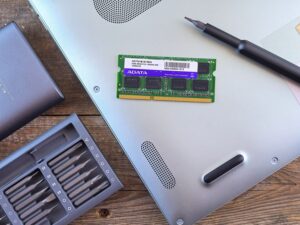
This one#8217;s easy in 2026: always an SSD, and specifically an NVMe one. The difference is night and day. NVMe drives hit real-world speeds around 3,500MB/s, while older SATA SSDs sit near 550MB/s #8211; that gap, you feel it every single time the laptop boots or an app opens.
How much ? 512GB is the sensible floor for most people. If you work with video, photos, or large files regularly, jump to 1TB and don#8217;t look back. Cloud storage helps, sure, but having space locally just makes life smoother.
The processor maze, made simple
Here#8217;s where people glaze over, so let me keep it human. On Windows you#8217;ve got three chip makers now : Intel, AMD, and Qualcomm. Apple does its own thing with Apple Silicon. A couple of cheats to read the names :
On Intel, #8220;Core Ultra#8221; means it#8217;s 2025-or-newer hardware #8211; that#8217;s what you want. On AMD, an #8220;AI#8221; in the name (like Ryzen AI) signals the newer silicon. For most people, a current Core Ultra 5/7 or a Ryzen 5/7 equivalent is plenty. Don#8217;t lose sleep over tiny generation differences ; the jump from a mid-tier to a higher-tier chip usually matters more than the exact generation.
And Apple ? The MacBook Air and Pro on Apple Silicon are genuinely brilliant for battery and everyday work. The catch : if you need specific Windows software, or you like the freedom to upgrade bits later, Windows is the more flexible road. Which camp are you in ?
Screen, battery and build #8211; don#8217;t ignore these

Specs aren#8217;t everything. You stare at the screen all day, so don#8217;t go below 1080p #8211; anything fuzzier and your eyes pay for it. OLED panels look stunning if your budget stretches, with deeper blacks and punchier colour. For size, 13 to 14 inches if you commute, 15 to 16 if it mostly stays put.
Battery : aim for a real 12 hours or more if you#8217;re often away from a plug. And be a little sceptical of manufacturer claims #8211; they rarely match heavy use. Build quality counts too. A flimsy hinge or creaky plastic body is the kind of thing that ruins a laptop long before the components do.
Can you upgrade it later ? Often, no
Worth knowing before you buy : more and more thin laptops have the RAM and sometimes the storage soldered to the board. That means no upgrades down the line #8211; what you buy is what you keep. So if a machine can#8217;t be upgraded, buy a bit more headroom now (there#8217;s that 16GB rule again). A few brands, like Framework, are built specifically to be opened up and improved. Lovely idea, that.
How much should you actually spend ?

Rough tiers to anchor you. Under £400 gets you basic browsing-and-email machines. Around £400–£800 is solid mid-range with proper processors and 16GB if you choose well. £800–£1,200 is the sweet spot for performance and good build. Above £1,200 you#8217;re into premium ultrabooks and creator-grade kit.
My honest take ? Most people are best served somewhere in that £600–£1,000 band. You rarely need to splurge at the top #8211; but skimping at the very bottom usually costs you more later in frustration and an early replacement.
The honest verdict
So, how to choose a laptop in 2026 without getting it wrong ? Nail your real use case first. Then insist on 16GB of RAM and an NVMe SSD #8211; those two alone prevent the most common #8220;it feels slow#8221; regret. Add a screen of at least 1080p, 12-plus hours of battery, and a build that won#8217;t fall apart. Do that, ignore the marketing noise, and you#8217;ll land a laptop that still feels good three or four years from now. And that, in the end, is the whole point, isn#8217;t it ?